Who doesn’t dream of having one of the iconic Star Wars droids at home? The future, when a robot can serve you in the kitchen or assist you with everyday tasks in other ways, is nearly here. Michael Shaw built a whole collection of D-O, R2-D2, C-3PO, and BB-8 droids using his 3D printer and Gambody’s droid STL files. While his creations don’t serve him and can’t communicate, they are life-sized and look extremely genuine!
Would you like to add a BB8 droid to your living room, along with its companions? Read the tips and tricks by Shaw to 3D print your favorite robot from Star Wars after upscaling its STLs to movie-like helpers. It’s fun, fantastic, exciting, and possible!
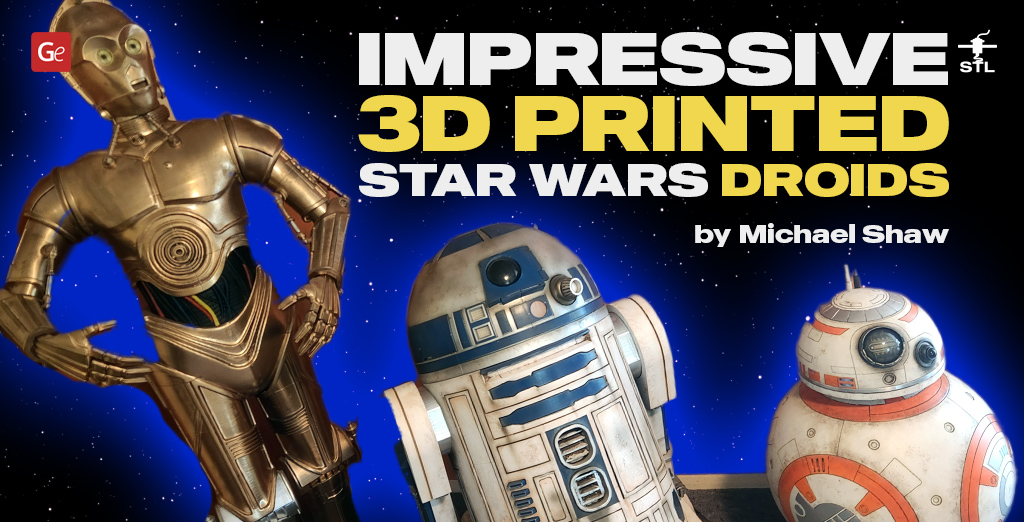
Star Wars Droids for 3D Printing
The once-seen robots in Star Wars can be brought from your screen into your living room with the help of a 3D printer. You’ll need high-quality STL files for resin printing and filaments for every droid you wish to make.

The sphere-shaped BB8 droid 3D printing files will let you recreate a fan-favorite character from Star Wars: The Force Awakens, who is excellent at repairing starships. Consider adding more 3D printed fantasy spaceship models to your collection to let BB-8 stay close to his favorite errands.

Download D-O droid STL files to recreate this curious helper from Episode IX. This roller character is very charismatic. It boasts a unique appearance. The coned head rests on a platform that attaches to a single wheel. You can add sounds and LEDs using the tunnels and articulate the model however you like.
Get cute R2D2 3D model files for printing this astromech droid that played an essential role in the Galaxy’s history. Being an active assembly model, this spacecraft mechanic has a lot of extendible sensors, articulated tools, detailed panels, a hollow body for easier LED introduction, a rotating head, and other fantastic details.
If you wish to add a C3PO 3D print to your collection of Star Wars droids, download C3PO STL files and reconstruct this human-cyborg using your desktop printer, imagining you are Anakin Skywalker who found the destroyed humanoid robot on Tatooine and brought it back to life.
Building a robot from Star Wars is a neat idea, even if your droid doesn’t walk or communicate with you like in the movies. Displaying a beloved character you once saw on TV in your room is a great idea for anyone who likes to be creative and has a 3D printer at home.
Read also: 3D Printed Articulated AT-AT Walker (Action Figure by Tom Anton).
Droid Making Tips: How to 3D Print BB-8, C-3PO, D-O, and R2-D2
What’s 3D printing droid figures like? Hobbyist Michael Shaw was kind once again to answer Gambody’s questions and share his unique experience about recreating a D-O droid and other models in life-size using PLA filament and several 3D printers running simultaneously.

1. Hello, Michael! It’s great to see that you continue to 3D print and build beautiful life-size figures. Your collection of Star Wars droids at 1:1 scale amazes us. How many models have you made so far?
I have built four droids from your collection, those being R2-D2, BB-8, D-O, and C-3PO.
2. Do you have your favorite Star Wars episode, film, or TV series? If yes, which one and why?
I have to say, more recently, the new Kenobi series was absolutely fantastic. It’s been cool to revisit older characters with more modern graphics and new stories.
3. It looks like your collection of Star Wars droids started with R2-D2 scaled to 400%. Which program did you use to upscale the STL files?
All the models have been scaled up and manually sliced using my chosen slicer software, which is Creality Print. BB8 droid was the only 3D model that fit on a 300 mm squared build plate and needed no slicing beforehand.
Read also: How to Split a Model in Half (Secrets of Large-Scale 3D Printing).
4. Did you have to run your two Creality K1s and two Creality Ender-3 v3kes 24/7 nonstop to make these Star Wars robots?
While I don’t know the exact print times, each of these droids was printed on 4-5 printers at a time nonstop until completion. Depending on the project, this can span from 3 days up to around 2 weeks. The more machines you have, the less daunting big 3D printing projects like these are, because they don’t take long to complete.
5. Why did you want to slice the R2D2 3D model yourself? Which slicer did you use? How did you like that experience?
I used Creality Print Slicer software and cut the files using their built-in cutting tool. This process was actually relatively easy. Once you determine the built plate sizes you are working with, such as 220x220x250mm or 300x300x300mm, you can slice each part to the desired size and save it individually for 3D printing.

6. Was it hard and long or easy and fast to print all R2D2 model’s 110 parts?
Once you get into a routine, each of the larger parts takes a similar time. So for me, I could have 4-5 parts printing at once and start them in the morning when I get up, then the next round in the afternoon when I get home from work, and the next round at midnight when I go to bed, and so on. This system streamlines the process, operating at a consistent pace each day.
7. You mentioned that you used 22 rolls of filament to complete your R2D2 3D print. Did you use a single brand of PLA filament or multiple options for this project?
R2-D2 droid was entirely printed in black Esun PLA+. This is my favorite filament because it prints exceptionally well and easily, has held up well in past projects, and is readily available in New Zealand.

8. Can you please describe your painting process for R2D2 model? How did you create such a realistic ‘dirt’ and ‘super beat up’ effect?
This was started with sub-assembling all the R2-D2 parts, so the main body, head, and legs were all separate. Each section is sanded with an electric palm sander and hand-sanded where the palm sander could not reach. Any problem areas are then filled with a body filler (Bog) and sanded back until they become as smooth as I am happy with. Then the whole thing is finished with Rust-Oleum Matte White. All details are masked off and painted, including all blue sections and chrome sections, all of which are Rust-Oleum paint.

Then comes the weathering technique. It is done in several passes. I start by making an acrylic wash, where black and a couple of shades of brown are mixed and sprayed with water to thin them down. The wash is then applied to all grooves and low points, followed by blotching and dabbing it off with a damp rag. For the flat body panel areas, the wash is applied with a sponge and then dabbed off again. This process is repeated again and again until the desired amount of weathering is reached. This is done with several different shades of wash on new passes to break up the wash so it isn’t exactly the same all over. Then some extra shading areas are touched up with the airbrush to add some different details and make R2-D2 droid stand out.
9. Did you follow the same steps when upscaling C-3PO to go along with R2-D2?
The upscaling and slicing were done the exact same way, although C3PO 3D print did not have the seams filled, nor did I sand all its layer lines. This Star Wars project was simply assembled and painted quickly and roughly. I didn’t weather it either.

10. If other enthusiasts want to follow your steps and 3D print life-size Star Wars droids, do you recommend them using furniture-style bolts and nuts? Any advice?
Using the Gambody files, there is no need to use hardware in any of these Star Wars robots. All parts are held together with a combination of superglue and 2-part epoxy.
11. Was your painting method for C-3PO different from R2-D2?
Yes, C-3PO was a lot quicker. I did not fully post-process him as he sits at the back of the room and is not seen up close.

12. Has your life-size BB8 droid been upscaled to 400% like R2-D2?
No, as the BB-8 FDM files are half scale, I simply printed everything at 200%.
13. What filament did you use to 3D print BB-8’s eye bulb, and how did you achieve the ‘glass’ effect?
This was actually resin printed in clear eSun resin, then wet sanded with a 1000-grit sandpaper. I then sprayed it with a high-gloss clearcoat on both sides and hit the inner edges with a light dusting of black using an airbrush to give it the effect you see.

14. Which life-size droid from Star Wars was the hardest and longest to sand and prepare for painting?
I would say that the R2D2 3D print was the hardest to finish, as it has some more complex shapes that take longer to sand down and are harder to get into with sandpaper. There were many seams to fill, whereas BB8 droid is cut up in such a way that every join is a seam that is supposed to be there as a panel line, so no seam filling was needed on any part of him.
Read also: Fabulous Millennium Falcon Build Diary with Custom Interior 3D Printable Parts.
15. How many weathering passes does a life-size Star Wars droid generally require?
As many as one feels is enough. Even a single pass is enough if you get the desired look you are after. I prefer 3-4 passes using different colors and methods, such as washes and airbrushing, which are the best.

16. Where did you learn to add fake lights with the airbrush to a Star Wars robot?
That was a personal experiment. I simply gave it a go myself, starting with a darker color as a base, then dusting a lighter one in the center, followed by a sharp, small spot of bright white to give the illusion of something shining.
17. Has D-0 droid followed all the steps of other droids to become a member of your Star Wars robot family?
Yes, D-O was created with exactly the same steps as the other droids.

18. Which of your droids in Star Wars is your #1 favorite and why?
While I’m a sucker for the classic R2-D2, I think the BB8 3D print is my favorite as it came out the best. It was finished to the best standard, and the weathering came out perfect.
19. Where do you display your life-size Star Wars droid collection?
Currently, they are all in my lounge/TV room.
20. You have mastered 3D printing static life-size models and weathering them so well! What are your plans for 2025 and 2026?
I would greatly appreciate it if you could have your BB-8 designer create a variant of him as BB9E, specifically the imperial version. I would love to have his counterpart on display with him.
Read also: Amazing BD-1 Droid 3D Print (How to Create Your Personal Buddy).
Whichever droid from Star Wars you wish to 3D print, growing your collection of life-size or regular-size figures, do it now! Follow the tips by a talented hobbyist on turning a 3D character model into a fantastic droid 3D print you’ll be proud of making. Ensure you post the photos of your masterpiece in Gambody – 3D Printing Community on Facebook, and feel free to share your experience with other enthusiasts who love Star Wars robots as much as you!

Best Battlestar Galactica Models to 3D Print with STL Files
Read Article
March Roundup: 3D Models of the Month
Read Article